Choosing an industrial monitor enclosure is not a cosmetic decision. It affects visibility, cooling, service time, and equipment life. MarketsandMarkets’ Industrial Automation Market report identifies stronger demand for connected factory equipment and rugged operator interfaces. Grand View Research also reports continued growth in industrial display applications. These trends raise a practical question: can the enclosure protect the monitor without making it difficult to use?
Rittal technology executive Dr. Thomas Steffen expresses the central design challenge: “Protection must support operation, not obstruct it.” The statement is simple. The choice is not. A steel enclosure may suit a dusty production line, while polycarbonate can reduce weight and resist corrosion. In either case, enclosure selection should follow the site conditions. Review dust, water, vibration, impact, temperature, and cleaning chemicals. Then compare the required NEMA rating with the IP classification under IEC 60529.
A useful industrial monitor enclosure should also provide clear viewing angles, sealed cable entry, internal airflow, and practical access for maintenance. A bright screen behind reflective glass can still fail the operator. A sealed box can also become a heat trap. That detail is easy to miss. It happened in many design discussions, including ours. Measure the monitor’s heat output, leave service clearance, and check the mounting surface before ordering. This guide examines those decisions, while acknowledging one uncomfortable truth: the cheapest enclosure is rarely the least expensive choice after downtime, replacement labor, and production disruption are included.
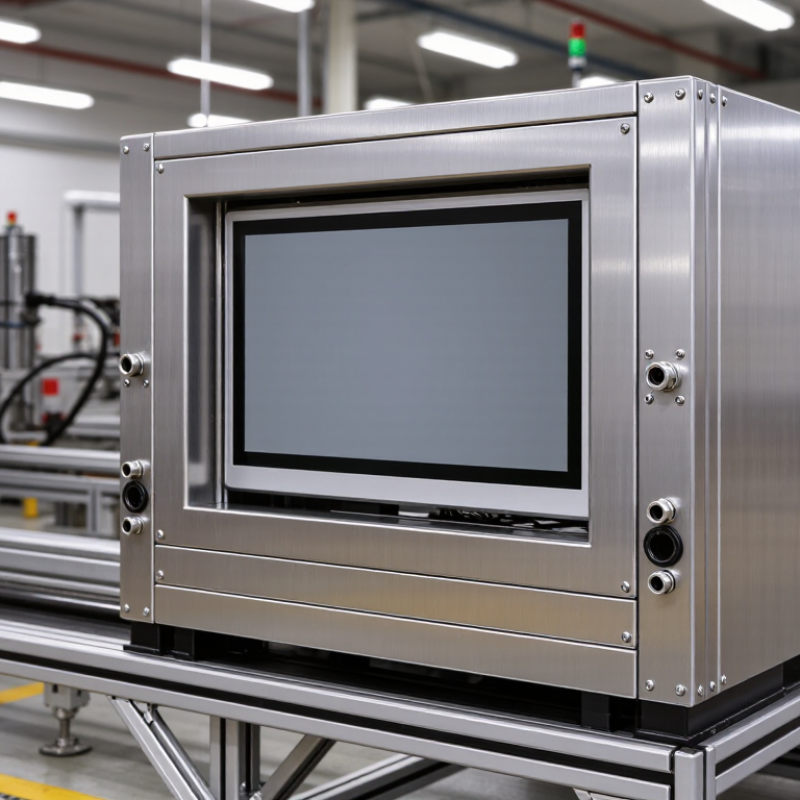
An enclosure should match the monitor’s real job, not merely its screen size. A production line may expose it to oil mist, metal dust, vibration, and gloved hands. A food-processing area demands smooth surfaces and frequent washdowns. A warehouse may need protection from impacts, temperature swings, and forklift traffic. Different risks require different materials, seals, mounting methods, and ingress protection ratings.
Study the installation point before selecting the enclosure. A wall-mounted unit needs a strong rear plate and safe cable routing. A panel-mounted display needs accurate cutout dimensions and enough space behind the cabinet. Outdoor installations require shade, drainage, UV resistance, and thermal planning. Heat trapped inside can shorten electronic life, even when the enclosure looks sealed. Check ambient temperature, airflow, condensation, and service access. Small details matter.
Talk with operators who clean, repair, and use the monitor daily. Their comments often reveal problems drawings miss. One practical mistake is choosing the highest protection rating without considering heat dissipation. That choice can create a reliable seal and an unreliable display. Field reviews sometimes change after technicians measure glove clearance. Recheck the enclosure against actual tools, connectors, and viewing angles. Assumptions are convenient, but industrial environments are rarely convenient.
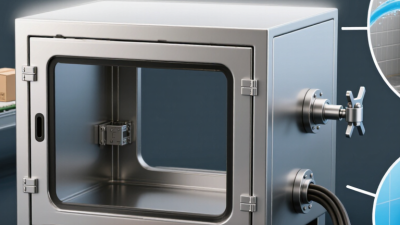
Choosing an industrial monitor enclosure begins with the environment, not the screen size. The enclosure must control risks that could damage electronics or interrupt operation. Begin by listing dust, water, heat, cold, vibration, and chemical exposure.
A dusty packaging area needs different protection from a wet processing room. Outdoor installations may face rain, sunlight, insects, and sudden temperature changes. Condensation is often overlooked. Do not guess.
Match the enclosure design to observed site conditions. An ingress protection rating can indicate resistance to dust and water, but it does not cover every hazard. Washdown areas may require sealed joints, suitable gaskets, and protected cable entries. Corrosive vapors can attack ordinary metal surfaces over time.
Vibration demands secure mounting and strain relief for connected cables. Check door hinges, cooling methods, and viewing-window materials as carefully as the enclosure shell. Small gaps matter.
In practical site assessments, I have seen teams select a sealed box and overlook internal heat buildup. A bright monitor may fail when sunlight raises the enclosure temperature near a machine.
Review the operating temperature range, ventilation strategy, and maintenance access. Ask operators where water collects and how often cleaning occurs. Test a sample enclosure under realistic conditions when possible. The wrong enclosure may look reliable during installation but reveal weaknesses months later. Field conditions rarely behave perfectly.
Material selection should follow the site, not appearance. Powder-coated carbon steel suits dry factory floors and moderate impact. Stainless steel performs better near washdown zones, salt, and chemical vapors. Polycarbonate reduces weight and resists many corrosive environments. Always verify the exact chemical exposure. Resistance tables can mislead.
The U.S. Department of Energy’s Industrial Decarbonization Roadmap estimates industry uses about 30% of total U.S. energy. Much of that energy becomes heat. A sealed enclosure can trap this heat around the display and control electronics.
ASHRAE TC 9.9 recommends 18–27°C for many controlled electronics environments. Industrial areas are often harsher. Add heat sinks, filtered fans, air conditioners, or vortex coolers when calculations require them. Condensation remains a serious risk.
A common mistake is choosing an IP rating without checking thermal performance. IP65 protection does not automatically prevent overheating.
Tips: Measure internal heat, ambient temperature, sunlight, and airflow before ordering. Select an enclosure with spare cooling capacity. I have seen installations fail because the door gasket was excellent, but the enclosure was undersized.
Recheck the design after adding a brighter monitor or extra controller. That small review matters. Data from the U.S. DOE and ASHRAE can guide decisions, but real site measurements should control the final choice.
Choosing an industrial monitor enclosure starts with the mounting surface, not the screen. In field installations, I measure the panel, frame, and cable path before selecting a housing. A wall-mounted unit needs a rigid backplate and clear anchor points. A suspended enclosure needs balanced weight and a secure arm connection. Small errors matter. A few millimeters can twist the display or strain the connectors.
Access requirements should guide the door, cover, and service layout. If operators adjust controls daily, use a front door with a practical viewing angle. For occasional maintenance, a hinged rear panel may protect the display and simplify inspection. Leave enough clearance for gloved hands, tools, and cable bends. Sealed gaskets are useful, but they can make service slower. I have seen technicians damage seals when access was too tight. That detail deserves more attention during design reviews.
Check the enclosure material against dust, moisture, vibration, and cleaning routines. Stainless construction may suit washdown areas, while coated metal can reduce weight in cleaner rooms. Confirm the ingress rating through documented testing, not appearance alone. Also inspect hinges, latches, vents, and mounting hardware as one system. A strong box can still fail when its bracket flexes. I would prototype the mounting position with a cardboard mock-up first. It is inexpensive, slightly awkward, and often reveals blind spots before fabrication.
Choosing an industrial monitor enclosure starts with evidence, not appearance. IEC 60529 defines IP protection against dust and water ingress. NEMA 250 covers enclosure construction and environmental performance in North America. These systems are not identical. Ask for test reports, operating temperature limits, and certification details before approving a design.
Maintenance deserves equal attention. A sealed cabinet can trap heat, especially near drives or continuous-process equipment. Specify ventilation, heat dissipation, and filter access based on measured load. Check hinges, latches, cable glands, and gasket compression during scheduled inspections. The Uptime Institute’s 2024 Annual Outage Analysis found that 54% of significant outages cost more than $100,000. A failed enclosure may not cause every outage, but poor thermal control can accelerate monitor and controller failures.
Look for corrosion resistance, vibration tolerance, and replacement parts that remain available for years. Stainless steel may suit washdown areas, while coated steel can work in controlled indoor environments. The wrong material still fails. Field technicians often discover damaged seals after repeated door opening, not during initial commissioning. That detail is easy to miss. Record inspection dates, ambient temperatures, and failure patterns. A practical enclosure decision should combine safety documentation, service access, and realistic lifecycle testing. Industry reports provide useful direction, but site conditions must overrule convenient assumptions.
Compare common IEC 60529 ingress protection ratings before selecting an enclosure. Higher IP ratings indicate greater tested resistance to dust and water ingress, but they do not replace application-specific safety reviews, maintenance planning, or material compatibility checks.
Selection guidance: verify the required IP rating against the actual cleaning method, humidity, dust concentration, temperature, and installation environment. During maintenance, inspect gaskets, cable glands, fasteners, and door seals for wear or contamination. Long-term reliability also depends on corrosion-resistant materials, thermal management, and the enclosure manufacturer's documented test evidence.
Reference: IEC 60529 defines the first IP digit for solid-particle protection and the second IP digit for water protection. The ratings shown are standardized protection levels, not brand or company performance data.