Top Waterproof Monitors for Outdoor Use?
Choosing a waterproof monitor for outdoor use means looking beyond a sealed-looking case. A screen beside a pool, on a covered patio, or in a dusty workshop faces different risks. Rain may strike at an angle, sunlight can wash out the image, and temperature changes can affect performance. Small details matter.
This guide compares monitors by their stated water and dust protection, screen brightness, glare handling, operating temperature, connection covers, and mounting options. An IP rating can help you compare products, but it describes specific test conditions; it does not promise protection in every installation. Check the manufacturer’s documentation, especially the rating for connectors and the monitor’s front and rear surfaces. A bright display is useful, too, but brightness alone cannot eliminate reflections from a glass door or wet tabletop.
The right waterproof monitor depends on where it will be installed and how it will be used. A sheltered garden display may need different protection from a unit exposed to wind-driven rain. Touchscreens, cables, and power supplies deserve attention as well. A robust monitor can still be let down by an exposed connector. That is easy to overlook. This comparison will help identify practical choices and explain which specifications deserve closer checking. Some product claims may sound reassuring, but real outdoor conditions are messy. Match the monitor to the exposure, and leave room for careful installation.
What Defines a Waterproof Monitor for Outdoor Use?
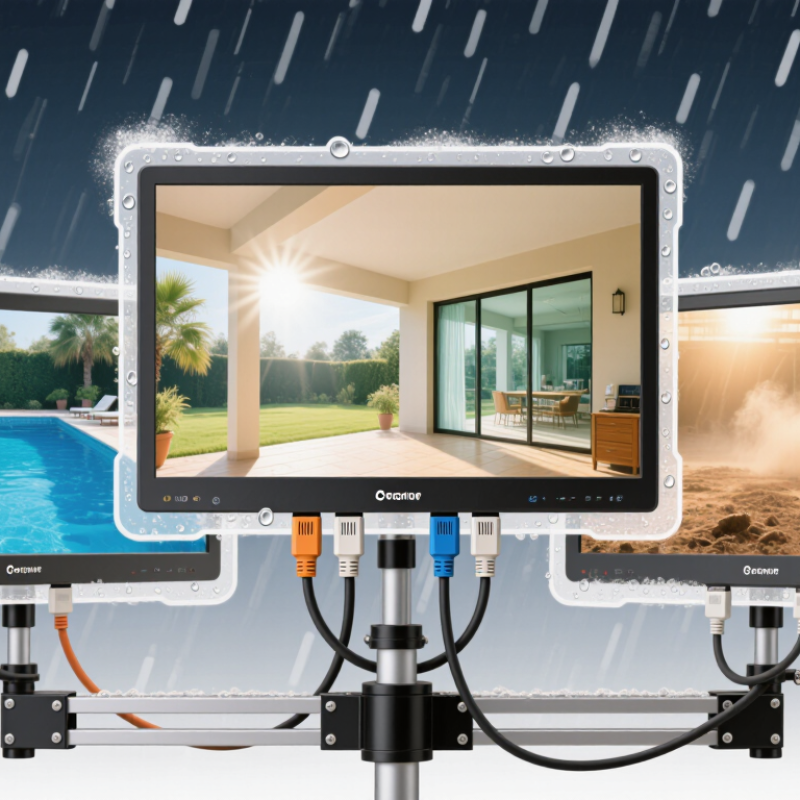
A waterproof monitor for outdoor use is built to resist specific environmental hazards, not every condition outdoors. Check its IP rating: the first digit describes protection from solids, while the second covers water exposure. For example, IP65 indicates dust-tight protection and resistance to water jets under test conditions. IP67 adds protection against temporary immersion in defined laboratory conditions. Neither rating guarantees safe operation in every storm or during prolonged submersion. Check the product’s operating temperature, sunlight readability, and whether its ports remain protected when connected. A sealed screen can still overheat in direct sun, and condensation may form when temperatures change quickly.
Tips: Inspect cable glands, connector covers, and mounting seals before installation. Keep connectors facing downward where practical, and avoid spraying water directly into seams. Read the manufacturer’s test conditions; ratings can depend on proper installation. Small details matter.
Outdoor suitability also depends on brightness and temperature control. A display near a sunlit window may need more brightness than one under a shaded canopy. Look for a stated operating range that fits local seasonal temperatures, and allow airflow around the enclosure. Clean the screen gently, since harsh chemicals or rough cloths can damage coatings. One limitation is easy to miss: an IP rating describes tested resistance, not long-term durability against UV exposure, salt, or vibration. Recheck seals over time. A rating is useful, but it is only part of the decision.
How Ingress Protection Ratings Measure Water and Dust Resistance
Ingress Protection, or IP, ratings describe how well an enclosure resists solids and water under defined test conditions. The first digit measures protection from dust and other particles, on a scale from 0 to 6. The second measures water resistance, typically from 0 to 8. An “X” means that part of the rating was not specified, not that the device is automatically unprotected. For example, IP65 indicates a dust-tight enclosure tested against water jets. IP67 indicates dust-tight protection and a limited, controlled immersion test. These ratings are not interchangeable.
Water finds gaps. A rating applies to the tested enclosure, not necessarily every cable, connector, or mounting point in an outdoor setup. Check whether ports are sealed during use, and consider rain direction, spray pressure, and how the monitor will be mounted. A downward-facing connector may shed water better than one facing upward, but installation details matter. Seals can also age, and temperature swings may create condensation inside an enclosure. An IP rating does not measure resistance to sunlight, corrosion, or long-term weather exposure. It is useful evidence, but not the whole story; the fine print can be easy to overlook.
Which Display Features Matter in Bright Outdoor Conditions?
In bright outdoor conditions, peak brightness matters, but the number alone can mislead. A display around 1,000 nits may remain readable in partial shade, while direct midday sun often calls for substantially more. Glare wins quickly. A matte, anti-reflective surface can reduce mirror-like reflections from windows or wet pavement. It may soften fine details slightly, so check text clarity at the intended viewing distance.
Optical bonding helps by removing the air gap between the display layers, which can reduce internal reflections and improve contrast. Strong contrast is essential: pale map lines and gray text can disappear in sunlight even when the screen is bright. Wide viewing angles also matter when someone reads the monitor from the side. If operators wear polarized sunglasses, test the screen in landscape and portrait orientations; some displays dim at certain angles.
Brightness should adjust smoothly as clouds pass, rather than jumping between distracting levels. Touch controls need enough sensitivity for gloved hands, though thick gloves can still cause missed taps. Look for stable color and brightness across the screen, not just a vivid center. Heat can also reduce sustained brightness, so specifications should include operating conditions. A few minutes of testing outdoors can reveal more than a polished showroom demo, and even that test may not match every season.
How to Compare Outdoor Monitor Types and Key Specifications
Outdoor monitors differ in more than their screens. A sealed industrial display may suit a covered loading bay, while a sunlight-readable model is better for an exposed control station. “Waterproof” is not a complete specification. Check the enclosure’s IP rating and confirm what the rating covers. For example, resistance to water jets does not automatically mean protection during immersion.
Brightness matters in direct sun. Compare the stated luminance in nits, then consider glare, viewing angle, and optical bonding. A bright screen can still be hard to read when sunlight reflects off its surface. Small details matter. Check whether the touchscreen works with gloves or raindrops, and whether its controls remain usable with wet hands.
Look beyond the display itself. Inspect connector protection, cable routing, mounting options, and the specified operating temperature range. A well-sealed screen can still fail if water reaches an exposed connection. Ask how the unit was tested, and compare those conditions with the real site: wind-driven rain, dust, heat, or sudden cold. Ratings help, but they do not predict every installation. I would leave some margin in the specifications; choosing the cheapest screen that barely meets the numbers can be a regret later.
Where to Install and How to Maintain an Outdoor Monitor
Choose an outdoor monitor location by balancing visibility, weather exposure, and access for maintenance.
A shaded wall or covered patio can reduce glare and heat buildup. Avoid spots where sprinklers hit the screen or rain collects around the mounting points. Check the display’s stated weather rating and temperature range before installation; “waterproof” does not always mean suitable for every outdoor condition.
Shade helps.
Use a stable mount attached to a surface that can support the monitor, and route cables through suitable weather-resistant protection. Keep ventilation openings clear, since trapped heat can shorten equipment life.
A small detail is easy to miss: afternoon sun may reach a wall that looks shaded in the morning.
For upkeep, inspect the screen, mount, cable entries, and seals every few months, and after severe weather.
Look for loosened fasteners, cracked seals, moisture, or fading. Clean the screen with a soft microfiber cloth and a cleaner approved for its surface. Avoid abrasive pads and high-pressure sprays, which can damage coatings or force water into openings. Unplug the monitor before cleaning when practical, and let it dry fully before reconnecting it.
Check after storms.
If condensation appears inside the screen, stop using it and consult a qualified technician rather than opening the casing yourself.
Outdoor dust returns quickly; that part is a little frustrating, but regular gentle cleaning is safer than scrubbing.