10 Essential Tips for Choosing Digital Signage Screens for Your Business?
Choosing the right digital signage screens for your business can be daunting. With so many options, it’s easy to feel overwhelmed. These screens come in various sizes, resolutions, and technologies. Each choice can impact your message delivery greatly.
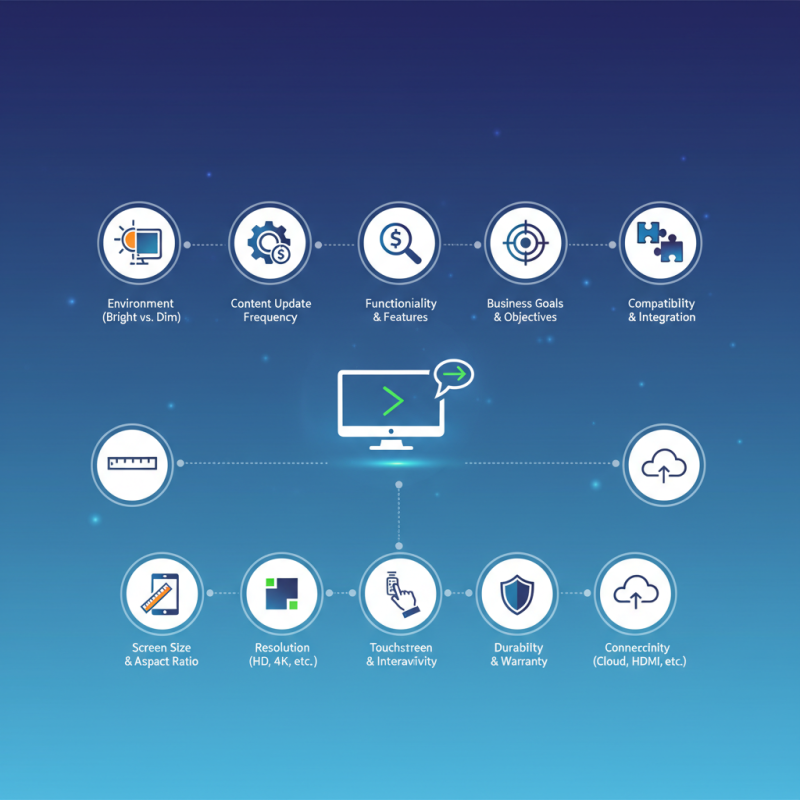
Think about the environment where the screens will be placed. Will they be in a bright area or a dimly lit space? This decision affects visibility. Also, consider how often you will update the content. Some digital signage screens allow easier updates than others.
It’s not just about price; functionality matters too. Look for features that match your business needs. Reflect on what goals you wish to achieve with these screens. Engaging customers is essential, but choosing poorly can lead to wasted resources. Ensure you take the time to evaluate your options carefully.
Understanding the Different Types of Digital Signage Screens
When selecting digital signage screens, understanding their types is crucial. There are various options available, each serving different purposes. For indoor settings, LED screens provide vibrant colors and high visibility. These screens catch attention and convey messages effectively. On the other hand, LCD screens often suit environments with less light. They offer good clarity but may struggle in direct sunlight.
Outdoor digital signage requires more durability. Weatherproof screens resist elements like rain and sunlight. Yet, they may come with higher costs. Consider your location and intended messages. Do you need bright, eye-catching displays? Or will subtler screens suffice? The resolution is another factor to ponder. Higher resolution means sharp, detailed images. However, these screens can be pricier.
Moreover, interactive screens have grown popular. They engage the audience directly, allowing for a dynamic experience. But maintenance and software updates can become burdensome. Reflect on the audience's preferences. Will they interact or pass by? Knowing this helps in your selection process. Balancing quality, durability, and cost is key to a smart investment.
10 Essential Tips for Choosing Digital Signage Screens for Your Business
| Tip Number |
Tip |
Description |
Type of Screen |
| 1 |
Consider Display Location |
Assess indoor vs outdoor settings and sunlight exposure. |
LED, OLED |
| 2 |
Check Resolution |
Higher resolution for clearer images, especially for detailed content. |
LCD, LED |
| 3 |
Evaluate Screen Size |
Choose size based on viewing distance and audience size. |
LCD, LED |
| 4 |
Think About Interactivity |
Consider touch screens for enhancing customer engagement. |
Touchscreen LCD |
| 5 |
Assess Connectivity Options |
Check for Wi-Fi, HDMI, USB for easy content updates. |
Smart LED, Digital Signage Displays |
| 6 |
Review Brightness Levels |
Brightness is crucial for visibility in various lighting conditions. |
LED, LCD |
| 7 |
Check for Durability |
Invest in sturdy screens for high-traffic areas. |
LCD, LED |
| 8 |
Analyze Cost of Ownership |
Consider both initial purchase and ongoing maintenance costs. |
All types |
| 9 |
Research Software Compatibility |
Ensure that the signage software works with the screen model. |
Digital Signage Displays |
| 10 |
Seek Professional Installation |
Opt for expert installation to ensure optimal setup and functionality. |
All types |
Evaluating the Size and Resolution for Optimal Visibility
When selecting digital signage screens, size and resolution are key factors. A screen's dimensions should correspond with the viewing distance.
Larger screens are often required in spacious areas to ensure visibility. In contrast, smaller screens may work effectively in close quarters, like retail settings. However, finding the right size can be tricky. It’s important to assess the intended location and foot traffic.
Resolution plays an equally vital role in clarity. High-resolution screens provide detailed images, making them suitable for content-rich displays. On the other hand, lower resolutions may suffice for simpler messages.
Comparing pixel density is crucial. A lower pixel density can result in a fuzzy display, failing to capture attention. Choosing the right resolution demands careful consideration of your visual goals.
Balancing size and resolution often involves compromises. A giant screen with low resolution may attract attention but fail to convey detail. Conversely, a small, high-resolution screen might not be noticeable enough in a crowded space. Working through these choices can be challenging, yet it's essential for effective communication. Think about the impact you want to achieve, and weigh your options wisely.
Considering Brightness and Contrast for Various Environments
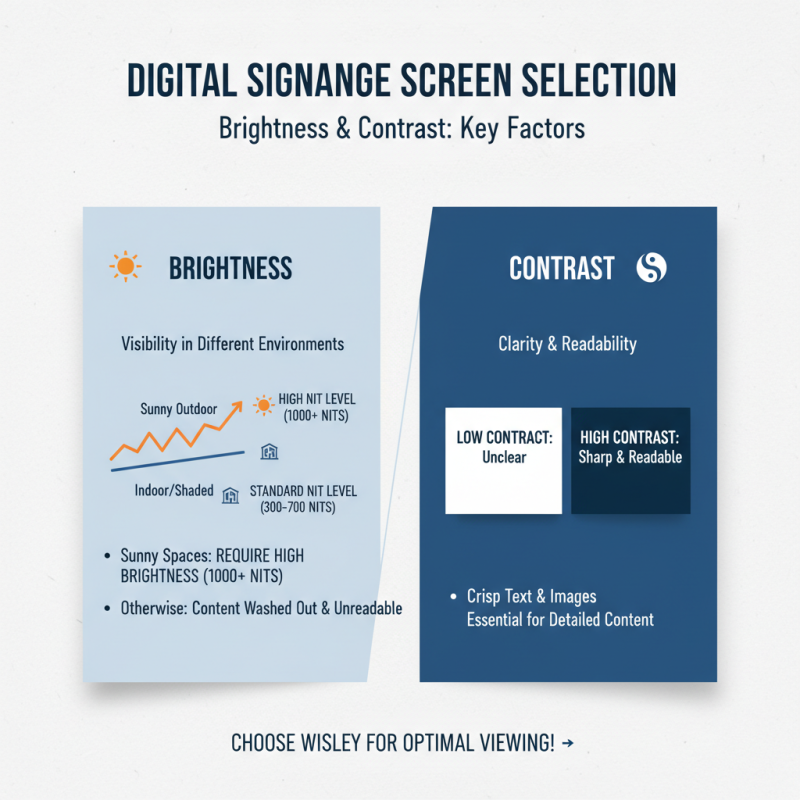
When selecting digital signage screens, brightness and contrast are critical factors. These elements significantly impact visibility in different environments. For example, a bright, sunny space requires screens with high brightness levels. Otherwise, the content may become washed out and unreadable. Ideally, the screen should reach at least 1000 nits or more for outdoor use.
Contrast is equally important. It ensures that text and images stand out clearly against the background. A higher contrast ratio enhances readability, especially in dimly lit areas. For indoor settings, screens generally need lower brightness but should maintain strong contrast to ensure clear visibility. Test various settings to find the right balance.
However, many businesses overlook these crucial details. They might settle for generic screens that don't meet their needs. Investing in the right brightness and contrast can seem like an unnecessary expense, but it’s essential for effective communication. Consider these elements carefully to avoid future regrets.
Exploring Content Management Systems for Effective Updates
When selecting digital signage screens, the choice of a content management system (CMS) can make or break your display strategy. A good CMS enables effective updates and ensures your content remains fresh. Look for user-friendly interfaces that allow easy editing and scheduling. This ensures your messages are timely and relevant. Moreover, consider the integration capabilities of the CMS. Connecting with existing systems can streamline updates and reduce workload.
Another factor to reflect on is the ability to customize your content. Not all CMS options offer flexible design templates or multimedia support. Your signage may suffer from a lackluster appearance if the system limits your creative options. You want screens that capture attention and convey your brand message effectively. Also, think about real-time data integration. A CMS that allows live updates can make your content more dynamic and engaging. This capability can enhance customer interaction, creating a more immersive experience for viewers.
Lastly, keep in mind the training required for your team. Some CMS can be complex, posing challenges for quick adaptation. A steep learning curve may hinder effective use, leading to missed opportunities for engagement. It's essential to evaluate how your staff will manage the CMS after implementation. Regular assessments of the system's effectiveness can uncover areas for improvement, ensuring it aligns with your business goals.
Budgeting for Initial Investment and Long-Term Maintenance Costs
When budgeting for digital signage, consider both initial investment and ongoing maintenance costs. A report from AVIXA reveals that businesses should allocate about 20% of their overall budget for technology updates each year. This figure emphasizes the importance of planning for longevity in your signage solutions. Maintenance costs can vary significantly, often ranging from 10% to 15% of the initial purchase price annually.
With initial installation, think about screen quality, hardware, and software systems. For instance, a high-resolution display might have a higher upfront cost but could enhance viewer engagement. Poor quality equipment may lead to more repairs and higher replacement rates. It's essential to assess total cost of ownership, not just the sticker price.
A 2022 study indicated that businesses frequently underestimate the costs of content creation and management. Companies can spend anywhere from $500 to $5,000 monthly on effective content strategies. Neglecting these ongoing expenses can strain budgets over time. Therefore, making comprehensive calculations during the initial phase is paramount. Reflecting on these elements can lead to better decision-making and efficiency in the long run.
Digital Signage Screens: Initial Investment vs. Long-Term Maintenance Costs