10 Essential Tips for Choosing the Right Digital Display Screen
Choosing the right digital display screen can profoundly impact your business. As industry expert Sarah Thompson states, "A display should engage and not just inform." This emphasizes the importance of thoughtful selection.
When exploring digital display screen options, consider your audience and environment. Will the screen capture attention? Brightness and resolution matter significantly. For instance, high-traffic areas need brighter displays to stand out. Yet, many overlook these factors, leading to ineffective displays.
Beyond technical specifications, think about your brand message. The screen should reflect your identity. Poor alignment can confuse viewers. Evaluating all aspects enhances the effectiveness of your digital display screen and ensures it resonates with your target audience.
Understanding Different Types of Digital Display Screens Available
When selecting a digital display screen, understanding the various types available is crucial.
Liquid Crystal Display (LCD) screens are popular for their affordability and versatility. They work well in most lighting conditions.
However, in bright environments, they might struggle.
Light Emitting Diode (LED) technology offers superior brightness and color accuracy.
These screens often consume less power, making them efficient choices. Yet, they can be more expensive upfront.
Organic Light Emitting Diode (OLED) screens are another option. Their vibrant colors and deep blacks are stunning.
They can be quite fragile, though, which might be a concern for certain applications.
Interactive display screens are gaining popularity as well.
These allow for user engagement, making presentations dynamic.
Still, their complexity can sometimes lead to technical challenges.
Understanding these differences can make the decision-making process daunting. Buyers may feel overwhelmed by options.
It’s essential to evaluate the specific needs of your project.
Budget constraints, location, and intended use will all factor into your choice.
Reflecting on these elements can avoid potential pitfalls in the selection process.
Consider how each type aligns with your goals before making a commitment.
Key Features to Consider in a Digital Display Screen
When choosing a digital display screen, key features are critical. One important aspect is resolution. High-resolution displays enhance clarity and detail. According to industry reports, 85% of users prefer screens with at least 1080p resolution. Lower resolutions can appear pixelated, which may impact viewer experience.
Another crucial feature is brightness. A minimum brightness of 250 nits is recommended for indoor settings. For outdoor displays, 1000 nits or more is essential for visibility. Brightness affects how well the content is seen in different lighting conditions. Not accounting for this could lead to significant issues, especially in direct sunlight.
Viewing angles also matter. Many displays fall short in this area. A good display should maintain color consistency at wide angles. Research shows that 45% of users often notice color shift when viewing from the side. This can be a deal breaker for presentations or environments with multiple viewers. It's important to test viewing angles before making a purchase.
Assessing the Appropriate Size and Resolution for Your Needs
When choosing a digital display screen, size and resolution are crucial. A study by the Digital Signage Federation suggests that 70% of consumers notice digital signage screens based on their size. Bigger screens can draw more attention, but the right size also depends on viewing distance. For example, a screen viewed from a distance of 10 feet should be at least 55 inches.
Resolution matters just as much. Higher resolution screens deliver clearer images. According to a report by the International Display Consortium, a 4K resolution is ideal for large screens. However, it comes with a premium price. Sometimes, lower resolutions can suffice, especially in settings where detailed images aren’t the focus.
Tip: Always think about the environment where the screen will be placed. Indoor screens may not need as high a brightness level as outdoor ones. Another point to consider is the content you'll display. High-resolution images are essential if your content is detailed. Make sure to balance cost and quality. It’s easy to overspend without considering your actual needs. Lastly, consider future growth. A size that seems adequate now may not be sufficient later. This requires some foresight.
Screen Size vs. Resolution for Digital Displays
Evaluating Connectivity Options for Digital Display Screens
When evaluating connectivity options for digital display screens, it’s essential to consider various factors. Studies show that 82% of users prioritize easy connectivity features. HDMI, DisplayPort, and USB-C are popular choices. Each option has advantages and disadvantages. HDMI is widely supported but may lack functionality for high-resolution displays. USB-C offers versatility but potential compatibility issues exist.
Assessing wireless options is also critical. Surveys indicate that 56% prefer wireless displays for ease of installation. However, latency can be a problem. Connecting via Wi-Fi introduces delays that can disrupt presentations. Many users might overlook this aspect until faced with synchronization issues. Cloud-based solutions are gaining traction, too, but often require stable internet access.
In the fast-evolving world of digital displays, ensuring the right connectivity can impact overall performance. According to industry reports, poor connectivity can reduce efficiency by up to 30%. Users often underestimate the importance of anticipating future needs. As technology progresses, accommodating upgrades is crucial for long-term usability. Choosing the right connectivity today can significantly influence future adaptability.
Budgeting for Your Digital Display Screen Purchase and Maintenance
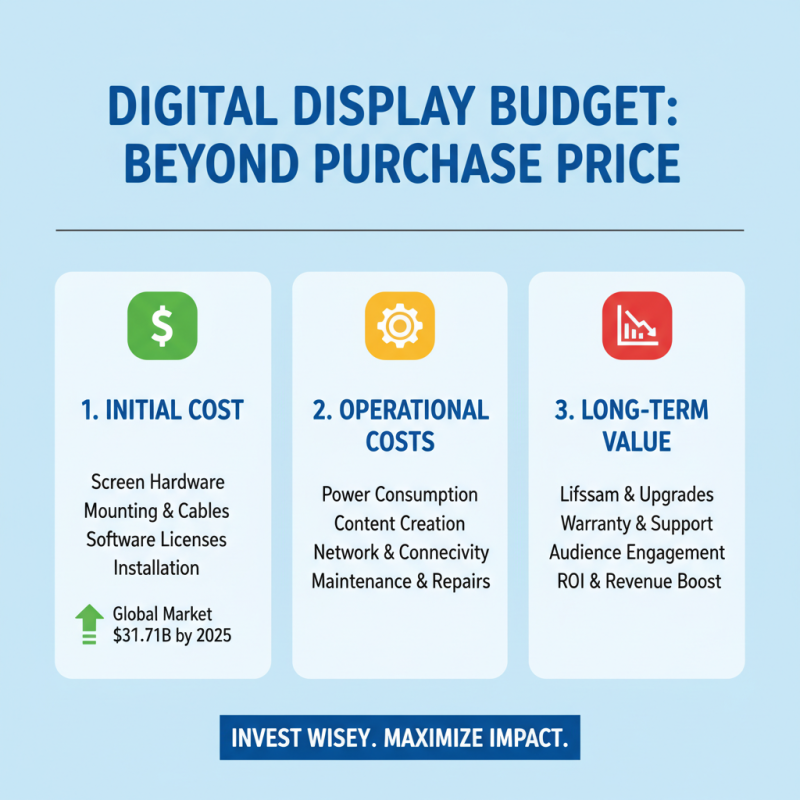
When budgeting for a digital display screen, it's essential to consider more than just the initial purchase price. A study by MarketsandMarkets indicates that the global digital signage market is projected to reach $31.71 billion by 2025. This growth illustrates the importance of investing wisely. However, many buyers overlook ongoing costs.
Maintenance is as crucial as the purchase itself. Regular servicing can prevent costly repairs down the line. A report from IHS Markit suggests that improper maintenance contributes to 30% of display failures. Set aside at least 10% of your budget for annual maintenance. This allocation may feel excessive, but it ensures optimal performance.
Power consumption also significantly impacts your budget. Digital displays can consume between 100 to 400 watts per hour, depending on size. Consider energy-efficient models. They can reduce costs over time, making them a smart long-term choice. Yet, upfront expenses can be daunting. Finding a balance between cost and energy efficiency will require careful reflection and research. When planning your budget, think holistically about all these factors.