How to Choose the Right LCD Screen for Your Needs?
Choosing the right LCD screen can seem overwhelming. The market offers various options, each designed for specific uses. According to a recent report by MarketsandMarkets, the global LCD screen market is expected to reach $135 billion by 2025. This growth reflects the increasing demand for high-quality displays across industries.
John Smith, a renowned expert in display technology, emphasizes, “Understanding your needs is crucial when selecting an LCD screen.” Different applications require different features, such as resolution, size, and brightness. For example, a screen for gaming may prioritize refresh rates, while one for professional design needs color accuracy.
Still, many buyers often overlook essential factors. They may focus solely on price or brand reputation, which can lead to dissatisfaction. A less-known specification might be the key to better performance in specific tasks. This need for careful consideration is vital to avoid mismatches between needs and product capabilities. In a rapidly evolving market, making an informed choice will enhance both productivity and enjoyment.

Understanding the Different Types of LCD Screens Available Today
When choosing an LCD screen, it's vital to understand the types available. Each type serves different purposes. The most common are Twisted Nematic (TN), In-Plane Switching (IPS), and Vertical Alignment (VA). TN panels often come cheaper. They have quick response times. However, color accuracy and viewing angles can be poor.
IPS panels provide better color reproduction. They are ideal for graphic design and photography. The viewing angles allow for better collaboration in a shared space. Yet, they may not always be the fastest. VA panels strike a balance. They offer deep blacks and good color contrast but can struggle with motion clarity.
Be aware that not all specifications tell the full story. Some users might focus too much on resolution or refresh rate. However, personal needs should drive the choice. Consider usage scenarios like gaming, professional work, or casual browsing. This understanding helps in making an informed decision. The right screen can enhance your experience significantly.
How to Choose the Right LCD Screen for Your Needs?
| Type of LCD Screen |
Resolution |
Refresh Rate |
Response Time |
Best Use Cases |
| TFT LCD |
1280x720 |
60 Hz |
5 ms |
Mobile Devices, Budget Displays |
| IPS LCD |
1920x1080 |
75 Hz |
4 ms |
Graphic Design, Gaming |
| VA LCD |
2560x1440 |
60 Hz |
8 ms |
Movie Watching, Office Work |
| OLED LCD |
3840x2160 |
120 Hz |
1 ms |
Professional Gaming, High-End Cinematics |
| LED Backlit LCD |
1920x1080 |
60 Hz |
6 ms |
General Use, Home Office |
Key Specifications to Consider When Choosing an LCD Screen
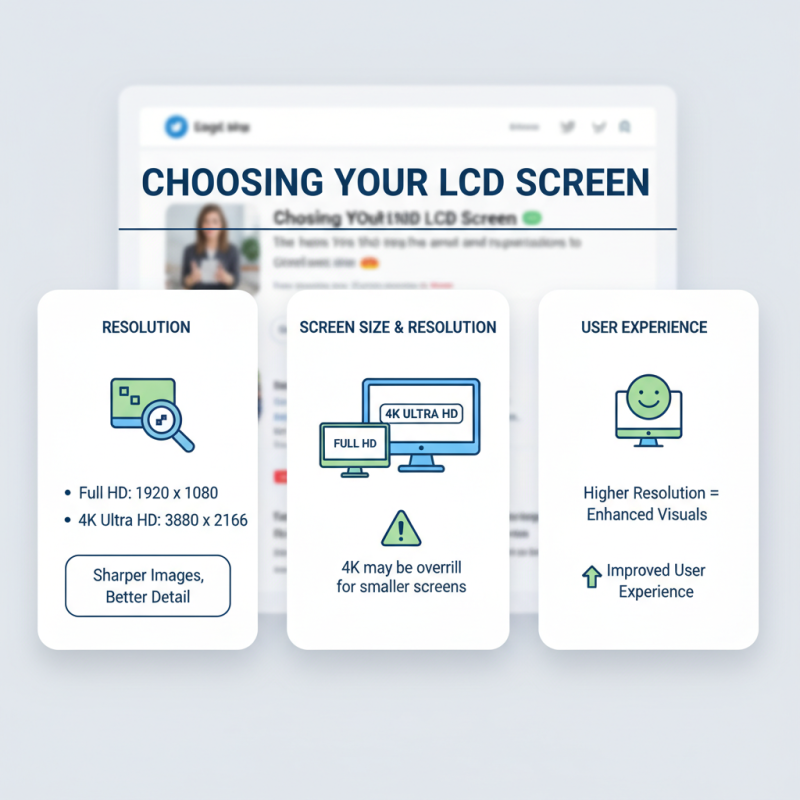
When choosing an LCD screen, several key specifications should be evaluated. Resolution is crucial. Most displays now offer HD, Full HD, or even 4K. Reports indicate that higher resolution improves user experience significantly. A Full HD screen provides about 1920 x 1080 pixels, while a 4K screen boasts 3840 x 2160 pixels. This leads to sharper images and better detail. Yet, 4K may be overkill for smaller screens.
Next, consider the screen size. It should fit your intended use. For instance, a larger screen may be beneficial for gaming or general media consumption. However, cramped spaces necessitate smaller screens. Current data suggests that screen sizes of 24 to 32 inches are popular for most users. Yet, the ideal size varies based on personal preference and room layout.
Another important aspect is refresh rate. A higher refresh rate offers smoother motion. Most LCDs range from 60Hz to 240Hz. For gaming, 120Hz or higher is often recommended. However, many users don’t notice the difference beyond 60Hz. This leads to questions about whether the investment in high refresh rates is justified, especially for non-gamers. Ultimately, personal requirements should guide your choice.
Assessing Your Usage Needs: Gaming, Professional, or Casual Use
Choosing the right LCD screen depends heavily on your specific needs. For gaming, you’ll want a screen with a fast refresh rate. A higher refresh rate, like 144Hz or more, makes gameplay smooth. Look for low response times too. These features help minimize ghosting and lag during intense gaming sessions.
For professional use, color accuracy is essential. Designers and photographers rely on vibrant, true-to-life colors. Consider screens with higher resolutions, such as 4K. They provide more detail for image editing. A wider color gamut can also make a significant difference in your work.
Casual users often have different priorities. A balance between performance and price is key here. You might enjoy watching movies or browsing the web. In this case, a decent mid-range screen suffices. Think about size as well; larger screens enhance the viewing experience, but space constraints can be an issue.
So, measure your desk before purchasing. Each intention requires careful consideration, and preferences can change over time. Reflecting on what truly matters to you will guide your decision.
Budgeting for Your LCD Screen: Finding Value for Money
Finding value for money when purchasing an LCD screen is crucial. According to a recent industry report, the average consumer spends about $300 on an LCD monitor. However, it's essential to consider what features are most important. Cheap screens may save you money upfront but could lead to costly replacements later. Screen resolution, color accuracy, and refresh rate should all be prioritized in your purchasing decision.
Many shoppers overlook warranty and customer service. A report by the Consumer Electronics Association highlights that up to 25% of technical issues arise within the first year. Investing in a screen with a solid warranty can offer peace of mind. On the other hand, you might end up paying more for a service plan that isn’t utilized.
The size of the screen matters, too. Larger screens often provide a better viewing experience but come at a higher cost. Be wary of trends. A flashy feature might not enhance usability but certainly increases the price. Think critically about your needs and avoid being swayed by marketing gimmicks. Make a checklist of must-have features versus nice-to-haves, and stick to it.
Budgeting for Your LCD Screen: Finding Value for Money
Additional Features to Look for in an LCD Screen
When selecting an LCD screen, consider additional features that enhance your viewing experience. Resolution is crucial. A higher resolution gives sharper images. Look for at least Full HD for good quality. This is essential for movies and games. But remember, higher resolution often means a higher price.
Color accuracy is another important factor. If you work in graphic design or photography, this matters greatly. Check reviews about color reproduction. Some screens offer extensive color gamuts. This can be impressive but might not fit all budgets. Also, consider the refresh rate. A higher refresh rate provides smoother visuals, especially in fast-paced content.
Connectivity options should not be overlooked. HDMI and DisplayPort are common, but some models come with USB-C or VGA. Think about your devices. Compatibility is key for ease of use. Lastly, check the screen's size and shape. A larger screen might enhance immersion, but it could overwhelm a small space. Do you truly need that extra size? Think carefully about your room layout.